
Clear Insights · Business Networking
UniFi Enterprise Networking: What It Means for Your Business
A dependable business network connects your team, security cameras, phones, and access control. UniFi’s latest enterprise announcement expands the options for building a resilient network—but the right upgrade starts with your property, not a product list.
What’s new in UniFi enterprise networking?
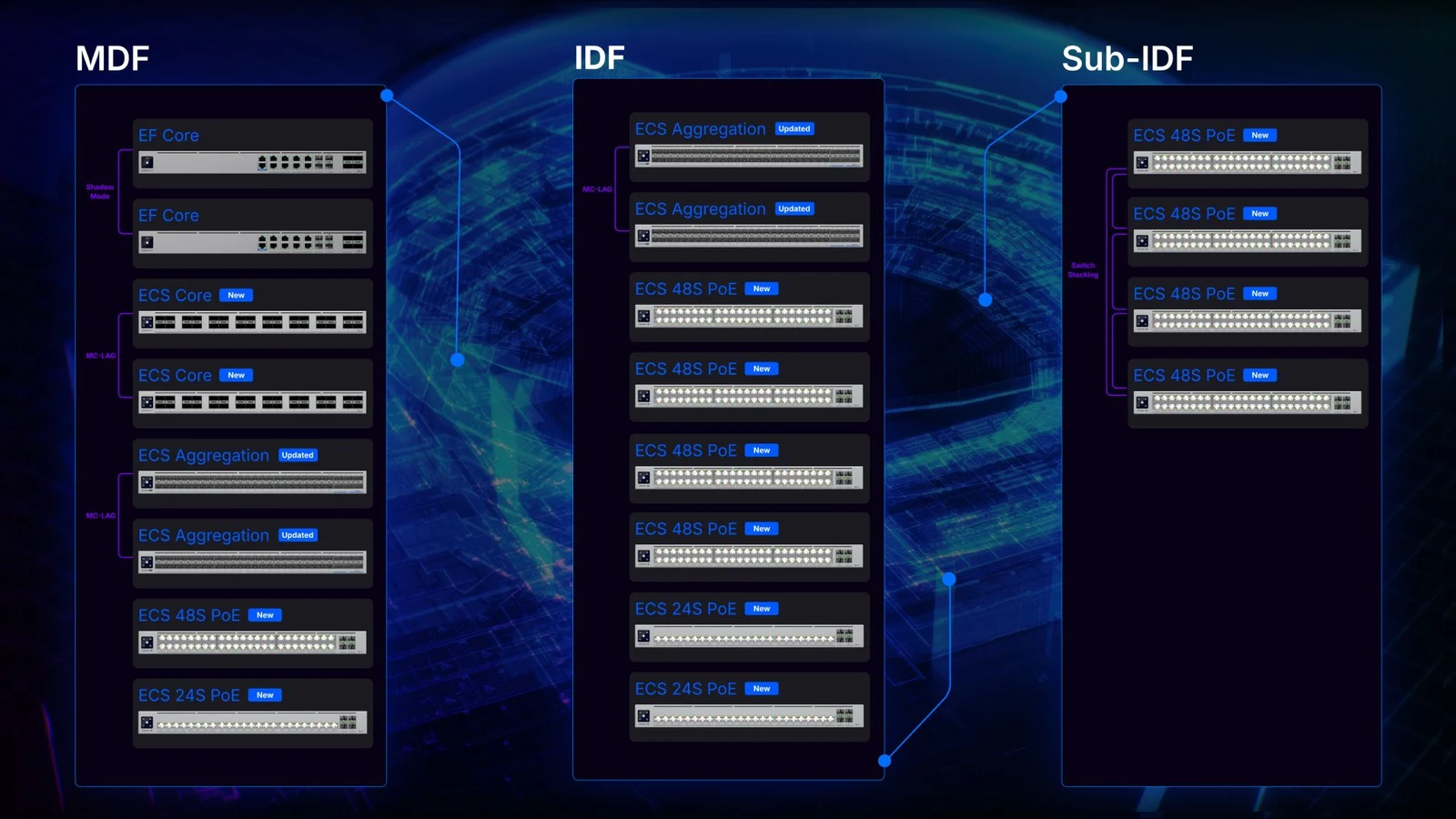
Ubiquiti’s September 3, 2026 announcement introduces improvements across the switching stack:
- More resilient aggregation: Updated firmware brings a rebuilt multi-chassis link aggregation engine and faster recovery capabilities.
- Higher-capacity core switching: The announced Enterprise Core Switch offers 100G connectivity and 3.2 Tb/s of non-blocking switching capacity.
- Next-generation access switching: Announced capabilities include 10 Gigabit Ethernet, high PoE capacity, MACsec hardware support, and a dedicated 100G stacking backplane.
- Better visibility: Digital Twin, Time Machine, and Optics Health add ways to understand network conditions and investigate problems.
These are platform announcements, not features available on every UniFi switch. Hardware selection, software versions, compatibility, and current availability need to be confirmed for each project.
Why reliability matters more than a headline speed
Think about what happens when a connection fails during a busy day. An office may lose shared resources. A hospitality property may interrupt guest connectivity. A managed property may lose remote access to connected systems.
We start with those operational consequences. Which connections are essential? What could interrupt them? What needs to continue working if a cable, switch, or power source fails?
Redundancy needs a complete design. Two switches connected through the same vulnerable pathway can still share a single point of failure. Backup connections need compatible equipment, appropriate configuration, and a plan for verifying recovery. The goal is a network that supports your business—not simply a rack with more equipment.
Cameras, Wi-Fi, and access control need a strong foundation
Installing capable devices is only part of the project. The network behind them needs enough capacity, appropriate power delivery, and a clear layout.
For a UniFi Protect camera system, that means considering camera traffic, recorder connections, storage, and remote viewing together. For Wi-Fi, it means looking beyond access-point placement to the cabling and switching that support each device.
Access control and business phones add their own requirements. Planning these systems together helps avoid an installation that works initially but becomes difficult to expand or maintain.
Explore our network infrastructure solutions and structured cabling services.
What this could mean for North Bay properties
Different properties call for different priorities. These examples illustrate design considerations, not completed Clear projects.
Napa wineries and hospitality properties
Separate buildings, guest areas, administrative spaces, and service entrances can make the backbone between buildings especially important. Planning should account for distance, available pathways, and which systems need to remain separate.
Sonoma commercial and industrial properties
Warehouses, workshops, and larger sites may need coordinated coverage across offices, loading areas, and detached structures. Expansion plans should inform cable routes and equipment locations before installation begins.
Marin offices and managed properties
Tenant improvements, shared spaces, and occupied buildings can require coordination with property managers and IT teams. Installation access, appearance, and documentation matter alongside performance.
These are starting points for a site assessment, not a one-size-fits-all county template.
Do you need an enterprise network upgrade?
Not every business needs 100G switching. A smaller property may benefit more from correcting coverage gaps, replacing a bottleneck, or improving its cabling.
An assessment is worthwhile when:
- Connections become unreliable during busy periods.
- You’re adding cameras, access control, or more wireless devices.
- Your business is expanding into another building or suite.
- One equipment failure would interrupt essential operations.
- Your existing network is poorly documented or difficult to support.
The right recommendation may be a targeted improvement, a phased upgrade, or a new backbone—not a complete replacement.
Start with your property, not a product list
Clear Telecommunications helps businesses across Sonoma, Napa, and Marin counties plan connected systems around their actual needs.
We start with your property, essential applications, existing infrastructure, and expansion plans. Then we determine which equipment and installation approach fit the project.
If you’re planning an office move, expanding a property, or bringing cameras and access control onto your network, tell us what needs to work better.
Discuss your business networkAnnouncement and image credits
Product announcement: Ubiquiti, “Introducing: Next-Gen Enterprise Networking,” September 3, 2026. Hardware imagery: Ubiquiti. This article is Clear’s planning perspective, not a claim of independent performance testing or deployment of every announced feature.